Tuesday, March 1, 2016

Affective Computing and Sentiment Analysis

.

Abstract

Understanding emotions is one of the most important aspects of personal development and growth and, as such, it is a key tile for the emulation of human intelligence. Besides being a important for the advancement of AI, emotion processing is also important for the closely related task of polarity detection. The opportunity automatically to capture the sentiments of the general public about social events, political movements, marketing campaigns, and product preferences, in fact, has raised increasing interest both in the scientific community, for the exciting open challenges, and in the business world, for the remarkable fallouts in marketing and financial market prediction. This has led to the emerging fields of affective computing and sentiment analysis, which leverage on human-computer interaction, information retrieval, and multimodal signal processing for distilling people’s sentiments from the ever-growing amount of online social data.

Keywords
Affective computing • Sentiment analysis • Five eras of the Web • Jumping NLP curves • Hybrid approaches


Erik Cambria, Dipankar Das, Sivaji Bandyopadhyay, and Antonio Feraco

.

https://www.semanticscholar.org/paper/Affective-Computing-and-Sentiment-Analysis-Cambria/d385f52c9ffbf4bb1d689406cebc5075f5ad4d6a

Read More

Sunday, October 11, 2015

Easy way to submit form data via ajax

Using jquery plug in from http://malsup.com/jquery/form/
.

Overview

The jQuery Form Plugin allows you to easily and unobtrusively upgrade HTML forms to use AJAX. The main methods, ajaxForm and ajaxSubmit, gather information from the form element to determine how to manage the submit process. Both of these methods support numerous options which allows you to have full control over how the data is submitted.Submitting a form with AJAX doesn't get any easier than this!

Quick Start Guide

1Add a form to your page. Just a normal form, no special markup required:
 id="myForm" action="comment.php" method="post">      Name:  type="text" name="name" />      Comment:        type="submit" value="Submit Comment" /> 
2Include jQuery and the Form Plugin external script files and a short script to initialize the form when the DOM is ready:
> 
> 


...
That's it!
When this form is submitted the name and comment fields will be posted to comment.php. If the server returns a success status then the user will see a "Thank you" message.
.
Read More

Sunday, March 1, 2015

html

---
Asas HTML Untuk Hybrid Apps Development
HTML Basics for Hybrid Apps Development
1) HTML adalah singkatan kepada Hyper Text Markup Language. Hyper bermaksud lompat, iaitu apabila pembaca mengklik elemen Hyper Text yang terdapat pada sesebuah laman web, dia akan "melompat" ke laman web yang lain.
2) HTML5 bermaksud HTML versi 5. Dalam versi ini, bahasa HTML telah disesuaikan untuk paparan dalam pelbagai peranti (device) dan ia juga menyokong elemen multimedia seperti audio, video dan animasi. Ringkasnya bahasa HTML menjadi lebih dinamik.
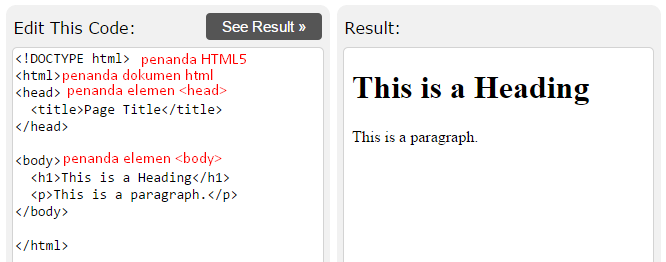
3) Struktur asas HTML adalah seperti berikut
sample.html
ini adalah penanda HTML versi 5
tag penanda dokumen html
tag penanda bahagian
  Page Titletag penanda untuk </span></p> <p class="c3 c1" style="font-size: 11pt; font-family: Arial; line-height: 1.15; padding-top: 0pt; padding-bottom: 0pt; widows: 2; orphans: 2; direction: ltr;"> <span class="c0" style="vertical-align: baseline; font-size: 11pt;"></head></span></p> <p class="c3 c1 c5" style="font-size: 11pt; font-family: Arial; line-height: 1.15; padding-top: 0pt; padding-bottom: 0pt; widows: 2; orphans: 2; direction: ltr; height: 11pt;"> <span class="c0" style="vertical-align: baseline; font-size: 11pt;"></span></p> <p class="c3 c1" style="font-size: 11pt; font-family: Arial; line-height: 1.15; padding-top: 0pt; padding-bottom: 0pt; widows: 2; orphans: 2; direction: ltr;"> <body> - <span class="c4" style="vertical-align: baseline; color: rgb(255, 0, 0); font-size: 11pt;">tag penanda untuk bahagian <body></span></p> <p class="c3 c1" style="font-size: 11pt; font-family: Arial; line-height: 1.15; padding-top: 0pt; padding-bottom: 0pt; widows: 2; orphans: 2; direction: ltr;">   <h1> This is a Heading</h1> - <span class="c4" style="vertical-align: baseline; color: rgb(255, 0, 0); font-size: 11pt;">tag untuk <heading></span></p> <p class="c3 c1" style="font-size: 11pt; font-family: Arial; line-height: 1.15; padding-top: 0pt; padding-bottom: 0pt; widows: 2; orphans: 2; direction: ltr;">   <p> This is a paragraph.</p> - <span class="c4" style="vertical-align: baseline; color: rgb(255, 0, 0); font-size: 11pt;">tag untuk <paragraph></span></p> <p class="c3 c1" style="font-size: 11pt; font-family: Arial; line-height: 1.15; padding-top: 0pt; padding-bottom: 0pt; widows: 2; orphans: 2; direction: ltr;"> <span class="c0" style="vertical-align: baseline; font-size: 11pt;"></body></span></p> <p class="c3 c1 c5" style="font-size: 11pt; font-family: Arial; line-height: 1.15; padding-top: 0pt; padding-bottom: 0pt; widows: 2; orphans: 2; direction: ltr; height: 11pt;"> <span class="c0" style="vertical-align: baseline; font-size: 11pt;"></span></p> <p class="c1 c3" style="font-size: 11pt; font-family: Arial; line-height: 1.15; padding-top: 0pt; padding-bottom: 0pt; widows: 2; orphans: 2; direction: ltr;"> <span class="c0" style="vertical-align: baseline; font-size: 11pt;"></html></span></p> <p class="c5 c11" style="font-size: 11pt; font-family: Arial; line-height: 1; padding-top: 0pt; direction: ltr; padding-bottom: 0pt; height: 11pt;"> <span class="c0" style="vertical-align: baseline; font-size: 11pt;"></span></p> </td></tr> </tbody></table> <p class="c1 c5" style="font-size: 11pt; font-family: Arial; widows: 2; orphans: 2; direction: ltr; height: 11pt;"> </p> <p class="c1 c5" style="font-size: 11pt; font-family: Arial; widows: 2; orphans: 2; direction: ltr; height: 11pt;"> </p> <p class="c1 c5" style="font-size: 11pt; font-family: Arial; widows: 2; orphans: 2; direction: ltr; height: 11pt;"> </p> <p class="c1 c5" style="font-size: 11pt; font-family: Arial; widows: 2; orphans: 2; direction: ltr; height: 11pt;"> </p> </div> <div id="footer" style="padding: 10px; border-top-width: 1px; border-top-color: rgb(204, 204, 204); border-top-style: solid; border-bottom-width: 1px; border-bottom-color: rgb(204, 204, 204); border-bottom-style: solid; font-family: arial, sans, sans-serif; background: rgb(240, 240, 240);"> Published by <a target="_blank" title="Learn more about Google Drive" href="https://docs.google.com/">Google Drive</a><span class="dash" style="padding: 0px 6px;">–</span><a href="https://docs.google.com/abuse?id=12OJaPrMMDll4N_m0Km3UnHWa7EBBKaotaAoVOIXoidQ">Report Abuse</a><span class="dash" style="padding: 0px 6px;">–</span>Updated automatically every 5 minuteshtml</div> <p> ---</p>
Read More

Sunday, February 1, 2015

jQuery Mobile Multi Page Geo Terrain

Adapted from:http://www.hongkiat.com/blog/html5-geolocation/

Read More

Document ready(...) vs on('pagecreate',...)

jQuery Mobile - Document Ready(..) vs on('pagecreate',...)

1) Single Page HTML uses Document Ready function

2) Multi Page HTML uses on('pagecreate',...)

WHY? Document ready() will only affect the first page. Therefore the codes will not render page when the second page is displayed on the screen. Refer: http://stackoverflow.com/questions/12051911/can-not-get-multiple-page-jquery-mobile-working-with-google-maps
Read More

Google Map with Marker (using jQuery)


Read More

Google Map with Marker (no jQuery)


Read More

Basic Google Map using jQuery ready() method to initialize/display the map


In this example, the shorthand version of the ready() method is used '$(function() { } );'.
Read More

Basic Google Map using DOM event to initialize/display the map


Read More